
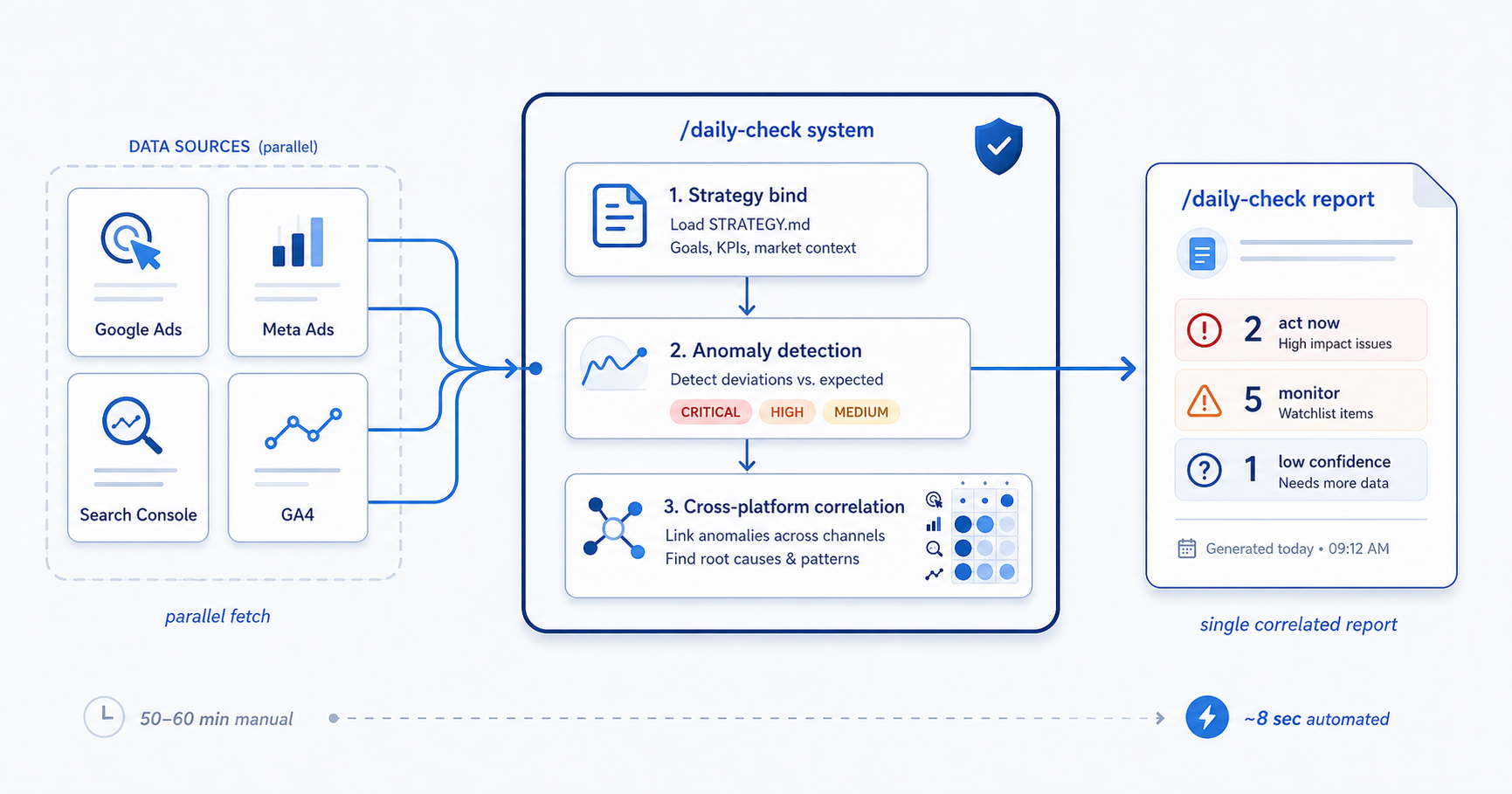
/daily-check is the one mureo command most operators run first. It
is also the one that best demonstrates the value of an orchestration
framework over a collection of platform-specific tools. This post
walks through what actually happens between an operator typing the
command and seeing a report — and what the manual equivalent would
cost in time and fidelity.
The manual daily process
Here is a reasonable version of what a technical marketing operator running four ad platforms has to do every weekday morning:
- Log in to Google Ads. Check campaign delivery status (any disapprovals? budget caps hit? learning phase?), compare yesterday’s spend to target, note any CPA drift >20%. Export a change history report for the last 24 hours. ~10 minutes.
- Log in to Meta Ads Manager. Same checks. Meta’s reporting has different attribution windows, different delivery classifications. ~10 minutes.
- Log in to Google Search Console. Pull the top 20 queries by clicks for the last 7 days, compare to the previous 7. Check whether any previously-top queries have dropped off. ~8 minutes.
- Log in to Google Analytics 4. Pull session-to-conversion for the organic-paid split, compare to paid-only attribution from step 1, reconcile (they will not match). ~10 minutes.
- Cross-reference: did the paid non-brand spend yesterday correlate with organic ranking changes? Did a Meta audience exhaustion trigger a Google Ads learning phase spike? ~15 minutes if done well; usually skipped.
- Write a short status update for the internal team or client. ~5 minutes.
Total, for a competent operator: 50-60 minutes, and step 5 — the cross-platform correlation — is the one step that meaningfully distinguishes good ad operations from tool-operating.
It is also the step most often skipped, because it requires holding four browser tabs open and a mental model of attribution-lag offsets that no single platform surfaces.
What /daily-check actually does
When an operator types /daily-check in Claude Code (or Cursor,
Codex, or Gemini with mureo configured), the workflow runs roughly
this sequence. All of it is inspectable in the OSS repo; nothing is
hidden:
1. Strategy bind
Read STRATEGY.md at the repository root. Extract the current
Goals weighting, any active Market context entries (e.g. known
seasonal pulse, known competitor action), and the Operation mode.
These become the frame for every downstream decision.
2. Parallel fetch across every connected surface
Issue platform queries in parallel:
- Google Ads — last 24h delivery, spend, conversions, CPA by campaign; learning-phase status; any disapproved ads; change history.
- Meta Ads — same shape, with Meta-specific fields for audience exhaustion, creative fatigue score, auction competitiveness.
- Amazon Ads — the same delivery shape, through the official Amazon Ads MCP that mureo bridges. Amazon reports one configured state per ad and no serving status, so whether an ad actually ran is read from its spend rather than asserted.
- TikTok Ads — campaign delivery through TikTok’s official hosted MCP. mureo has no native TikTok tools, so the Meta- and Google- specific checks are skipped and the platform-agnostic anomaly detector runs in their place.
- Search Console — last 7-day impression/click/position deltas for the top 50 queries.
- GA4 (via MCP) — sessions-to-conversion, attribution split paid-vs-organic, anomaly flags on key events.
Each call mureo issues itself runs through the validation layer (GAQL for Google Ads; typed request builders for Meta and GA4). Nothing the agent fetches is raw-string injected; nothing leaks the credentials that authenticated the request.
3. Anomaly detection
The combined data set feeds the anomaly detector. Sample-size gates suppress single-day noise. Severity tiers (HIGH / CRITICAL) pick out what actually warrants attention.
4. Cross-platform correlation
The non-trivial step. The workflow cross-references:
- Paid non-brand spend vs organic ranking. If a paid campaign on a keyword cluster reduced spend yesterday while the organic position for the same cluster dropped today, that is a brand-visibility gap and gets flagged.
- Meta creative fatigue vs Google Ads volume. When Meta’s audience shows fatigue signals and Google Ads volume spikes, the likely explanation is demand being displaced to search — not a new demand signal. The workflow will suggest monitoring, not scaling.
- GA4 engagement anomalies vs platform-attributed conversions. A conversion count that looks normal in Google Ads but shows abnormal bounce / time-on-page in GA4 is a conversion-quality problem, not a conversion-quantity one. The workflow recommends investigating attribution before adjusting bids.
No single platform surfaces any of these correlations. Each is
specific to ad ops as a discipline; each is in the diagnostic knowledge
base that /daily-check consults.
5. Strategy-gated recommendations
For each flagged anomaly, the workflow checks the strategy. A CPA
spike on a campaign tagged as brand defense is weighted differently
from a CPA spike on a campaign tagged acquisition. The output is
not “here are 14 things that changed” — it is “here are 2 things the
strategy says you should act on; here are 5 things to monitor; here
is 1 thing the data is too thin to call either way.”
6. Report
A single text output to the agent’s chat. Optionally writes a
daily-check-YYYYMMDD.md to the account’s state directory for team
sharing.
Why this is different from a dashboard
A SaaS dashboard can, in principle, implement most of the above. Two reasons it generally does not:
- Dashboards optimize for displaying data. They do not optimize
for refusing to display low-signal data. The sample-size gate —
the thing that makes
/daily-checkactually signal rather than noise — is fundamentally incompatible with the “more widgets good” dashboard paradigm. - Dashboards do not know the strategy. They aggregate what the platform APIs return. Strategy is operator knowledge that lives outside the platform schema. A dashboard can add a “goals” section that the human has to read; mureo binds the strategy into the execution path of every decision.
mureo does ship a screen. mureo configure serves a read-only
Reports tab on your own machine, and a run writes to it: the one
line worth acting on today, at most three highlights, the per-campaign
verdicts, and the figures those verdicts rested on. What the screen
does not do is form an opinion. It renders what the run concluded and
stops there — a figure mureo will not stand behind shows as a dash
rather than a zero, and the KPI tiles and the daily chart are computed
from stored totals rather than written by whoever drew the page.
/daily-check is not a better dashboard. It is a replacement for the
morning process that produced the dashboard.
Time comparison
| Step | Manual | /daily-check |
|---|---|---|
| Strategy bind | 0 (operator carries it in their head) | Automatic |
| Platform fetch × 4 | ~40 minutes | ~8 seconds, parallel |
| Anomaly detection | Visual scan; misses | Explicit |
| Cross-platform correlation | ~15 min if done; usually not | Automatic |
| Strategy-gated filter | Mental model | Explicit |
| Written report | ~5 minutes | Automatic |
Roughly a 50–60 minute process compressed into a single command. The value is not the time saved — it is that the cross-platform correlation step, the one that distinguishes competent ad ops from tool-operating, actually gets run every day instead of once a week when the operator has time.
That is the premise of the whole mureo framework: give a disciplined ad operator the workflow coverage that, manually, only the best of them run consistently.