
Update (2026-09-17):
GOOGLE_ADS_DEVELOPER_TOKENis optional (legacy) as of mureo 0.18.0 — Google retired the Google Ads API developer token on 2026-09-09. Thedocker runexample below works with that line removed.
mureo’s primary install path — pip install mureo followed by
mureo setup claude-code — assumes a single operator on a single
workstation. It is the most ergonomic path. It is also the wrong path
for a non-trivial chunk of real situations: scheduled runs in CI,
agency teams managing N client accounts, MCP clients other than
Claude Code, or a one-shot evaluation that should not touch the
host’s Python environment.
The Dockerfile that landed in mureo 0.6.x covers exactly that gap.
Where the container fits
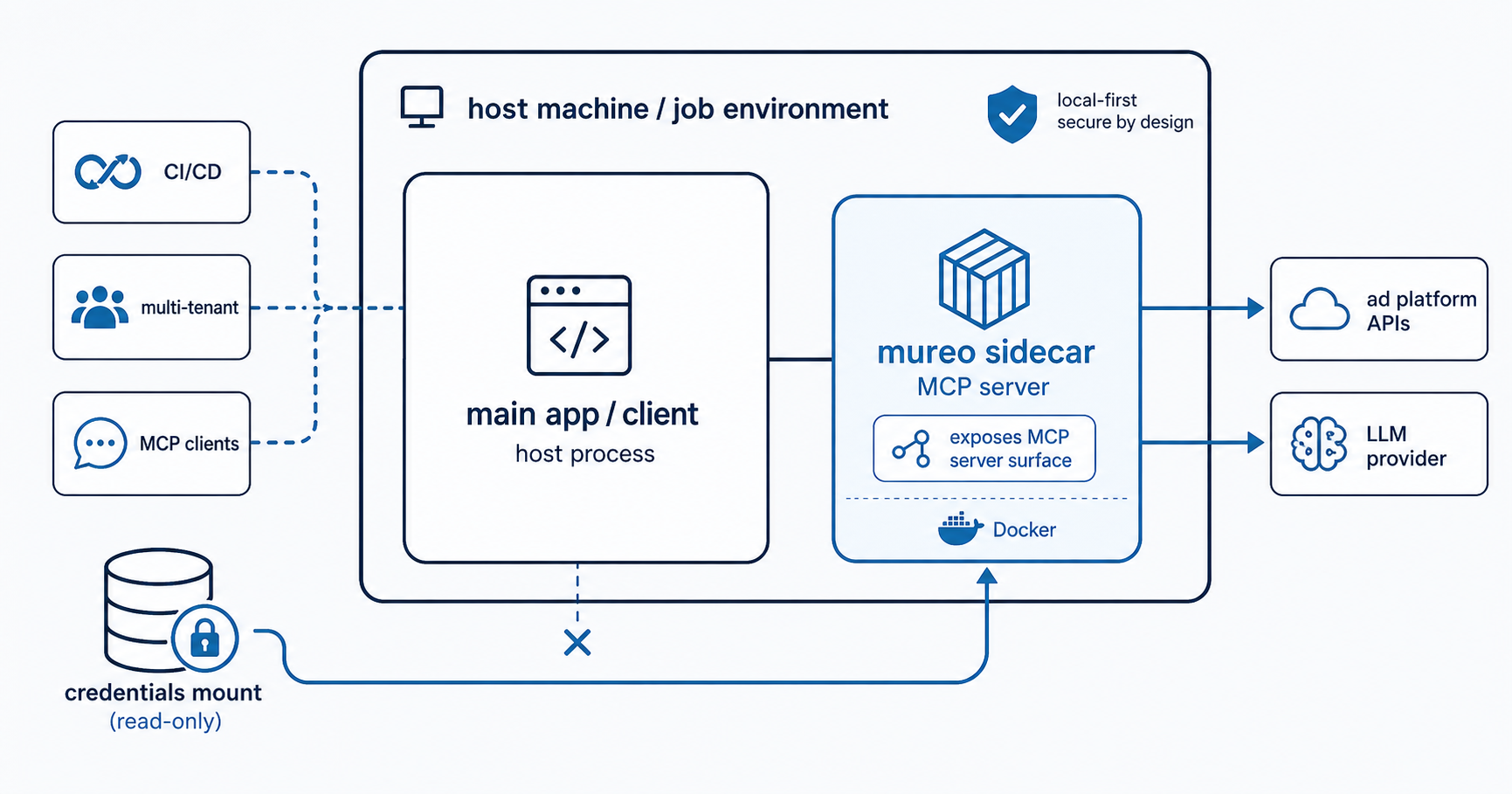
Four use cases the image is built for:
- Non–Claude Code MCP clients. Cursor, Codex CLI, Gemini CLI,
Continue, Cline, Zed, or any custom MCP client that speaks stdio
can point its config at
docker run mureoinstead of a host Python invocation. - CI/CD scheduled runs. Anomaly checks at 09:00, rollback dry-runs nightly, weekly reports — anything that wants mureo to exist for the duration of a job and disappear after.
- Multi-tenant / agency ops. One container per client account means credentials never co-mingle on a shared workstation. A compromised session in one container does not see the other client’s tokens.
- MCP registry health checks. Glama and similar registries introspect server capabilities; the image’s introspection-only default env vars let those checks succeed without exposing real credentials.
What it is not for: the rich Claude Code experience. Slash
commands (/daily-check, /rescue), the credential-guard PreToolUse
hook, and skill auto-loading are Claude Code UX features that depend
on pip install mureo plus mureo setup claude-code. The container
exposes the MCP server surface only.
What is actually in the image
python:3.11-slimbase- Non-root
mureouser (groupmureo) — credentials directory must be readable by that uid when bind-mounted from the host - Layer-cached dependencies:
pyproject.tomlresolves first, then sources are copied — so iterating on mureo source does not re-download deps - OCI labels (
source,license,vendor,documentation) for registry surfaces - Default
CMD ["python", "-m", "mureo.mcp"]— MCP server over stdio
A full docker build is on the order of seconds after the first
layer cache. The image is small enough to ship as a sidecar in any
orchestrator without measurable startup cost.
Three credential patterns
The Dockerfile documents three credential-loading paths, each appropriate to a different operating context:
1. Mounted credentials file — simplest, if ~/.mureo/credentials.json
already exists on the host (from a prior mureo auth setup, a
team-shared vault, or hand-crafted JSON):
docker run --rm -v ~/.mureo:/home/mureo/.mureo mureo2. Environment variables — for CI/CD pipelines where secrets come from a secret manager rather than disk:
docker run --rm \ -e GOOGLE_ADS_DEVELOPER_TOKEN=... \ -e GOOGLE_ADS_CLIENT_ID=... \ -e GOOGLE_ADS_CLIENT_SECRET=... \ -e GOOGLE_ADS_REFRESH_TOKEN=... \ -e META_ADS_ACCESS_TOKEN=... \ mureoSupported variables cover the full Google Ads + Meta Ads surface (developer token, client id/secret, refresh token, login customer id, customer id; Meta access token, app id, app secret, account id).
3. Interactive wizard inside Docker — the novel one. Run the auth wizard inside the container, write the resulting JSON to the mounted volume, never install Python on the host:
docker run -it --rm -v ~/.mureo:/home/mureo/.mureo \ mureo mureo auth setupSubsequent runs pick up the credentials automatically via pattern 1. This is the path for an evaluator who wants to confirm mureo works against a real account before deciding to install it on their workstation.
What you lose by going container
Honest tradeoffs for the Claude Code surface:
- Slash commands (
/daily-check,/rescue, etc.) — Claude Code reads these from~/.claude/commands/. Not present in the container. - Credential-guard hook — Claude Code reads its PreToolUse hook
from
~/.claude/settings.json. The container cannot install one there. - Skills auto-loading —
~/.claude/skills/is operator-side. The container does not interact with it.
The container is the MCP server. Everything that wraps the MCP server with operator-side UX is, by construction, operator-side.
When to reach for it
Reach for the container if:
- You are not using Claude Code (Cursor, Codex, Gemini, custom MCP)
- You are running mureo in CI
- You need per-client credential isolation in an agency
- You want to evaluate mureo without installing Python locally
Stay with the local install if:
- You are a solo operator on one or two ad accounts
- You want the slash-command UX
- You want skills and hooks auto-loaded
Bottom line
The Dockerfile is not a replacement for pip install mureo. It is
an alternate surface for the cases where the local install is the
wrong shape. The local-first commitment from
the manifesto still holds: credentials come from
the operator’s environment (whether that environment is a host
machine, a container with a bind mount, or a CI runner with secret
injection), and no mureo-operated infrastructure sits in the
critical path.
Containerisation just changes where “the operator’s environment” lives. Everything else — the GAQL validator, the rollback gate, the anomaly detector, the strategy bind — is byte-identical to the local install.
The image lives in the OSS repo at
logly/mureo. Build, point your
MCP client at it, and the rest of mureo behaves the same way it
does on a workstation.